
Hairteach
AGT DIGITALBeauty
3.04.00 Reviews
- Version
- 3.2.5
- Installs
- 10.00K
- Age Rating
- Everyone
Screenshots
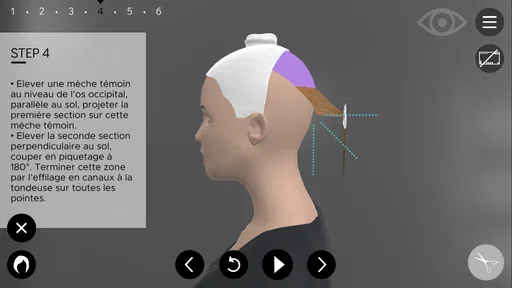
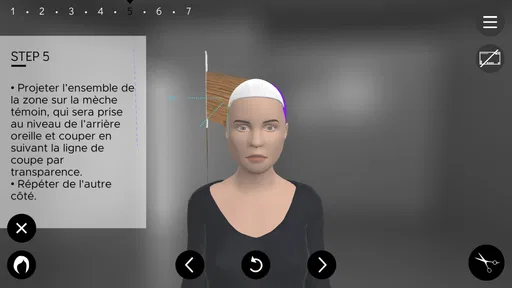
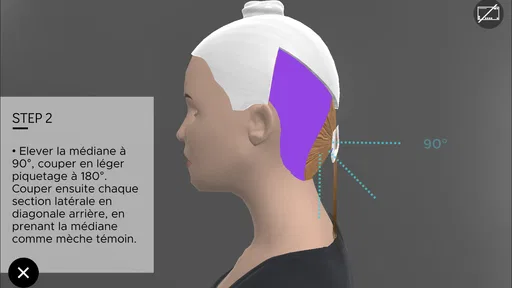
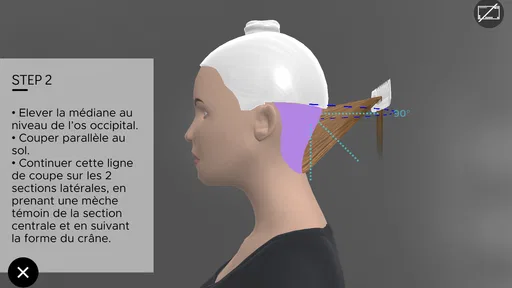
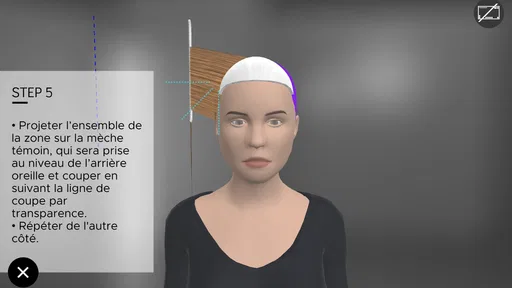
Our Review of Hairteach
 Analysis by Appyee
I approached Hairteach as a practical beauty-learning app rather than as a salon appointment tool or a simple hairstyle gallery. Its focus is clear: it aims to help people learn from hair professionals, which makes it more useful when you want guidance than when you only want a quick picture for inspiration. I tested it with that distinction in mind, especially because beauty apps are often opened casually on a shared phone or tablet and used by more than one person in a household.
The app is free, developed by AGT DIGITAL, and listed for everyone. That combination makes it easy to consider for a family device, a beginner’s phone, or a spare tablet used while getting ready. At the same time, the modest average rating of 3.0 from around 66 ratings suggests that expectations should stay realistic. I would not treat it as a polished replacement for every modern video-learning platform. I see it more as a focused resource for people who want hair education in one place and are willing to explore its material patiently.
How Hairteach fits into everyday household use
I find Hairteach easiest to fit into a household routine when everyone treats it as a shared learning reference, not as a personal stylist or a substitute for professional advice. A quick conversation about who is practicing, which tools are suitable, and where to place the device can make the first session calmer and safer. That everyday rhythm also helps explain why a shared screen can be useful.
A useful app when one device serves several people
The most natural shared-device scenario is a household where different people have different reasons to open a beauty app. One person may be learning how to handle their own hair, another may be looking for ideas before a special occasion, and someone else may simply want to understand basic styling techniques. Hairteach can sit comfortably in that kind of routine because its subject is broad enough to interest beginners without requiring every user to have the same hair type, skill level, or goal.
I can imagine using it on a tablet in a bedroom or bathroom while preparing for the day. A parent might look through a lesson before helping a child with a hairstyle, while another family member checks a technique later. The important benefit is not that it turns the household into a salon; it is that the learning material can become a shared reference point. Instead of passing around screenshots or trying to explain a technique from memory, users can return to the app and review the relevant instruction.
That said, I would keep the expectations modest. The store summary presents Hairteach as a place to learn from the best, but a short summary cannot tell you whether every lesson will match your hair texture, length, tools, or experience. I found it more sensible to treat the app as a starting point for learning rather than a guarantee of a perfect result. Hair styling depends heavily on the person doing it, the condition of the hair, and the equipment available at home.
Why a shared screen can be better than a personal phone
Hair work often needs both hands, so a larger shared screen can be more comfortable than a phone held close to the face. If I were following a lesson while practicing, I would place the device somewhere visible and pause whenever I needed to copy a step. This is one of the app’s practical strengths as a learning resource: it encourages a slower, observe-and-try rhythm instead of the rushed browsing associated with social media feeds.
A shared screen also changes the conversation around the app. A teenager can show a parent what they want to learn, or two siblings can compare techniques without sending content back and forth. That does not mean Hairteach provides household coordination tools; it simply means its subject matter works well when people discuss and practice together. The coordination comes from the users, not from assuming the application manages family activity.
I would still avoid leaving the device unattended around water, heat, or styling products. That is ordinary practical advice, but it matters more with a beauty-learning app because users may be watching while using dryers, straighteners, brushes, or other equipment. Hairteach can explain a technique, but it cannot replace careful handling of tools or judgment about what is safe for a particular person.
What each person should expect before opening it
For a beginner, the appeal is straightforward. The app gives the idea of learning through instruction rather than relying only on attractive finished images. That difference matters. A gallery may show what a style looks like, but it rarely explains hand position, order, preparation, or the small corrections that make a result easier to achieve. Hairteach is better suited to someone who wants to understand the process.
For an experienced user, the value depends on how much new material the lessons provide. Someone who already follows professional educators elsewhere may find the app less essential, particularly if their preferred platform offers a larger, constantly updated library. I would use Hairteach as a compact reference or an additional source of ideas, not automatically as my only education tool.
For a household with children, the everyone age label makes the app approachable, but it should not be mistaken for a detailed child-safety or family-management system. An adult may still want to decide when the app is used, which techniques are suitable, and whether a child should handle heated or sharp styling tools. The age label describes the app’s general audience; it does not make every activity appropriate without supervision.
Keeping expectations clear on a device used by several people
Before installing it on a shared phone or tablet, I would agree on a simple routine: use the app for learning, avoid changing another person’s device settings, and leave the screen clean and ready for the next user. This may sound basic, but shared devices become frustrating when one person assumes the app is personal and another expects it to remain neutral. Hairteach is easier to live with when everyone treats it as a common reference rather than as a private diary.
I would also avoid assuming that one person’s progress, preferences, or viewing history should represent the whole household. If the application offers any personalized behavior, users should be conscious that a shared device can blur those boundaries. Where the app does not clearly separate people, the practical solution is to keep individual expectations separate and avoid relying on a single shared setup for personal learning records.
Setup boundaries before the first lesson
Hairteach was released in 2015 and its current version is 3.2.5, with support beginning at Android 7.1. Those details matter when the app is going onto an older household device. A spare tablet may be perfectly useful for lessons, but I would check that it meets the operating-system requirement before planning around it. On a newer device, installation should be a more straightforward decision; on an older one, compatibility deserves attention first.
The app is free, which removes the biggest barrier for trying it with several people. I like that approach for a household because nobody has to justify a purchase before discovering whether the teaching style suits them. Free access also makes it practical to install temporarily on a shared device and evaluate it during an ordinary week rather than judging it from the store summary alone.
Still, free does not automatically mean frictionless. I would give the app a short trial period before making it part of a regular routine. Open a few different lessons, check whether the explanations feel understandable, and see whether the content matches the person’s actual needs. A user with thick, curly, short, long, damaged, or chemically treated hair may require advice that is more specific than a general lesson can provide.
One useful setup boundary is to prepare the physical space before starting. Put the device where the screen can be seen without touching it constantly, collect only the tools the lesson calls for, and keep a towel or brush nearby if appropriate. This turns the app from passive browsing into a more controlled learning session. It also reduces the temptation to improvise with unsuitable products simply because a technique looks easy on screen.
Account boundaries and personal privacy
Household use raises a practical question: should each person have a separate identity inside the app? I would not assume that shared access automatically creates separate profiles or private learning areas. If the app presents content without strong personal separation, the simplest approach is to use it as a shared library and keep personal notes elsewhere. That prevents confusion about whose preferences or activity are being represented.
This is especially relevant when an adult and a child use the same device. An adult can choose the learning material together with the child and explain which steps are suitable to try. The child can then watch and ask questions without the family pretending that the app itself is supervising the activity. For a teenager, the arrangement may be more independent, but the same principle applies: the device owner should be clear about shared access and household expectations.
I would also avoid building a routine around an account that several people need at the same time. If one person is midway through a lesson, another may want to browse something unrelated. On a shared device, coordination is often easier when users agree to finish or pause a session rather than assuming the app will preserve a separate place for everyone. That is a small trade-off, but it can determine whether the app feels convenient or annoying in daily use.
Coordinating practice instead of merely watching
The strongest way to use Hairteach is to turn a lesson into a small practice plan. I would watch the technique once without touching my hair, identify the tools and sequence, then replay or revisit the difficult section while practicing. This three-stage approach is more effective than trying to copy every movement immediately. It also helps reveal whether the lesson is genuinely understandable or only visually appealing.
In a household, one person can act as the observer while another practices. The observer can notice skipped steps, hold the device steady, or remind the learner where the lesson left off. This is particularly helpful for styles that are hard to see from the front. The app supplies the learning material, while the second person supplies the extra viewpoint that a phone screen cannot provide.
A second useful workflow is to compare the result with the starting goal rather than with a professional finish. If a child wants a simple school hairstyle, the household should judge whether it is comfortable, secure, and repeatable, not whether it looks like a salon photograph. If an adult is preparing for an event, it may be better to practice a manageable version several times than to attempt the most complicated technique once.
I would keep a short list of lessons or techniques that worked well, but I would not assume the app itself is the best place for that record. A note on the device can include the style name, the tools used, and what went wrong. This makes the next session more efficient and avoids repeatedly browsing without learning from earlier attempts. It is a simple habit, yet it gives a free educational app more lasting value.
Age, trust, and realistic supervision
Because Hairteach carries an everyone rating, it is reasonable to consider it for a broad household audience. The content area is beauty, not an adult-only subject, and the learning purpose is easy to understand. Even so, age suitability and practical safety are different questions. A young user may understand the lesson but not be ready to use a heated appliance, strong product, or technique that pulls on the scalp.
I would let younger users watch with an adult first and choose low-risk practice activities. Brushing, sectioning, arranging, and discussing the order of steps are more suitable starting points than immediately copying every tool-based technique. The adult should make the final call based on the child’s maturity and the equipment involved. Hairteach can support instruction, but it cannot assess the user’s surroundings or physical ability.
Trust also matters for older children and teenagers. A shared beauty app can be a positive way to discuss self-expression without turning every hairstyle into an argument. I would ask what the user wants to learn, look at the lesson together when needed, and focus on comfort and care rather than imposing one idea of what hair should look like. That makes the app a conversation starter instead of another source of pressure.
For adults, the main trust issue is different: do the lessons fit the user’s actual hair and routine? Professional-looking instruction can still be unsuitable if it assumes tools, products, or textures that are not available at home. I recommend treating each technique as an idea to adapt. Start gently, stop if there is pain or excessive pulling, and remember that an app cannot inspect hair condition in person.
How it compares with familiar beauty alternatives
Hairteach occupies a narrower space than a general video platform. A large video service offers endless variety, current creators, comments, and search results, but it can also bury a useful lesson under unrelated clips and inconsistent advice. Hairteach’s appeal is the promise of a more focused learning environment centered on hair. If I want to browse without distraction, that focus is valuable.
Compared with social media, the app is better suited to deliberate learning than rapid trend discovery. Social feeds are excellent for seeing what is popular, but they often reward short, dramatic demonstrations that leave out preparation and troubleshooting. A dedicated hair-learning app can encourage a more patient approach. The trade-off is that it may feel less lively or less frequently refreshed than the platforms people already use every day.
Compared with a salon consultation, Hairteach is obviously more accessible and free, but it cannot offer personalized diagnosis. A stylist can examine texture, density, damage, scalp condition, and the way a cut grows out. The app cannot do that. I would use it to prepare questions, practice basic techniques, or explore possibilities before speaking with a professional, not to replace expert advice for difficult hair or scalp concerns.
Compared with a static hairstyle gallery, Hairteach has a more useful educational purpose. A gallery helps answer, “What might I like?” A lesson-based resource aims to answer, “How might I attempt it?” That makes it a better match for someone who wants repeatable skills. However, users who only need inspiration for a haircut or color may find a visual gallery faster and less demanding.
Where the app may disappoint
The average rating of 3.0 indicates a mixed reception, and I think that is a fair reason to approach the app with curiosity rather than certainty. A focused concept does not guarantee that every user will enjoy the presentation, find the exact technique they need, or feel that the lessons match modern expectations. The app’s age also means that people accustomed to highly polished contemporary platforms may notice a difference in design or overall smoothness.
Another limitation is the gap between watching and succeeding. Hair techniques are physical skills. A lesson may appear clear while you are viewing it, yet feel difficult when your hands are working behind your head or when you cannot see the back of your hair. This is not a failure unique to Hairteach, but it affects how much value the app delivers. The best results come from repeating small sections and adapting the method to your own proportions and hair behavior.
I would skip Hairteach if I wanted a fully personalized routine, professional diagnosis, or a highly social beauty community. I would also choose another option if my main goal were instant trend updates or a vast creator ecosystem. The app makes more sense for a learner who values focused hair instruction and is comfortable supplementing it with personal judgment.
My household verdict after using it
Hairteach is easiest to recommend as a low-risk learning resource for a household that wants to explore hair styling together. It costs nothing to try, is aimed at everyone, and comes from AGT DIGITAL with a clear beauty focus. The app works best when users slow down, practice one technique at a time, and treat the screen as guidance rather than as an authority that can account for every head of hair.
I would install it on a shared device for a beginner, a parent and child who want a joint activity, or an adult who prefers structured instruction to random browsing. I would not make it the only source of hair advice, and I would not assume that a shared installation automatically handles separate users, private progress, or supervision. Those boundaries need to be managed by the household.
My final view is cautiously positive. The concept is practical, the free price makes experimentation easy, and the learning angle gives it more purpose than a simple image collection. Its mixed rating and older release mean it is not a universal recommendation, but that does not make it irrelevant. If you use Hairteach as a focused starting point, practice safely, and coordinate clearly on a shared device, it can earn a useful place in a household beauty routine.
For someone who wants personalized salon-level guidance, the usual alternatives will be stronger. For someone who wants to learn, compare techniques, and involve another person in the process without paying first, this app is worth trying. Just begin with modest expectations, test whether its teaching style suits you, and let your own hair, tools, age, and comfort level decide which lessons are actually appropriate.
Verdict
Strengths of Hairteach
- Clear visual lessons make hairstyling techniques easier to follow.
- Useful for beginners seeking structured guidance at their own pace.
- Covers practical skills that can be revisited whenever needed.
- Mobile access lets users learn without attending an in-person class.
- Can help stylists refresh techniques between professional sessions.
Limitations of Hairteach
- Some lessons may require specific tools or products to practice properly.
- Learning results depend heavily on hands-on practice outside the app.
- Advanced users may find parts of the content too basic.
- Video quality and loading may vary depending on your internet connection.
- The app may not replace personalized feedback from an experienced stylist.
Similar Picks in This Category
View All
Beauty Makeup Editor & Camera
Photo & Video Editors - Instant Solution4.7

Perfect365: Face Makeup Editor
Perfect365, Inc.3.5

Mirror Plus - HD Mirror app
Digitalchemy, LLC4.8

Cute Lock Screen & Wallpapers
Prometheus Interactive LLC4.6

HD Camera for Android
One Music Player4.5

Phone Mirror app - True Mirror
Cards4.6
Frequently Asked Questions
What is Hairteach, and what can I use it for?
Hairteach is an educational app focused on hair care, styling, and beauty techniques. It is designed to help users learn through guided lessons, demonstrations, and practical recommendations. Depending on the available content, you may find information about hairstyles, hair maintenance, tools, products, and professional methods. It can be useful for beginners, beauty enthusiasts, and anyone hoping to improve their hairdressing skills.
Is Hairteach suitable for beginners without professional hairdressing experience?
Yes, Hairteach can be useful for beginners, especially those who prefer learning at their own pace. The lessons and demonstrations are generally easier to follow when users start with basic techniques before moving on to more advanced styles. However, results may depend on hair type, length, and personal skill. Beginners should practice carefully and avoid using heated tools or chemicals without proper precautions.
Does Hairteach provide practical video lessons or only written information?
Hairteach is intended as a learning platform, so its usefulness depends largely on the type of lessons and media included in the version you install. Users should check the app description and available previews to confirm whether courses contain videos, step-by-step instructions, images, or other interactive material. A stable internet connection may also be required for streaming lessons or accessing updated educational content.
Is Hairteach free to download, and are there in-app purchases?
The download price and available features may vary between Android and iOS, as well as by region and app version. Hairteach may offer free access to some content while reserving complete courses, advanced tutorials, or additional resources for a subscription or one-time purchase. Before downloading, review the store listing carefully, including trial terms, renewal conditions, and any in-app purchase information to avoid unexpected charges.
Can Hairteach replace professional advice for hair or scalp problems?
No. Hairteach should be regarded as an educational and styling resource rather than a substitute for a licensed hairstylist, dermatologist, or medical professional. Tutorials may not account for allergies, scalp conditions, damaged hair, or individual sensitivities. If you experience persistent irritation, hair loss, or another concerning symptom, stop using potentially irritating products and seek qualified professional advice before following any treatment-related recommendation.
